About Overtur™ Mobile
A suite of tools where project collaborators and door hardware consultants can collaborate on specifications and security design for doors, hardware & openings. Overtur™ Mobile provides a suite of tools for Overtur users...
A suite of tools where project collaborators and door hardware consultants can collaborate on specifications and security design for doors, hardware & openings.
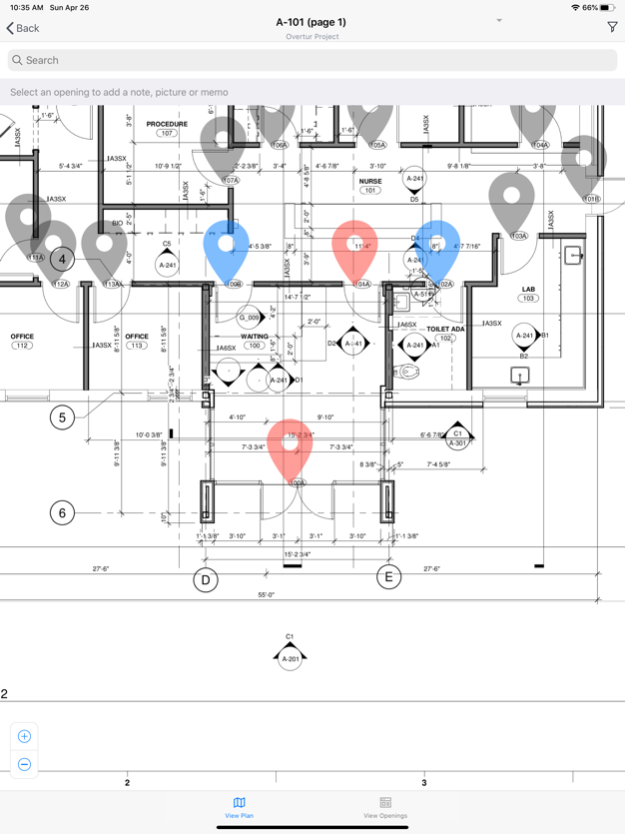
Overtur™ Mobile provides a suite of tools for Overtur users to stay connected to their openings project when on the go. When users log into their Overtur project via the Mobile app, they can:
- Survey existing conditions on a project and sync back to Overtur on the web
- Review and edit project details
- Add and remove collaborators
- Email collaborators
- Transfer Ownership of a project
- View project files
- Create Punch Lists
- Document product installation
The Site Survey tool enables users to capture data while on a project and sync it to the web. Features include adding/editing door and frame data and capturing photos, notes, and voice memos. The Site Survey tool is one of the must-have tools for capturing the existing conditions of a project.
The Punch List tool enables users to walk down a completed installation with a set of plans and the hardware sets and products for the project. Users can accept or flag the door hardware on a door, or the opening itself, then further add notes, take photos, attach pre-snapped photos, or add voice memos.
The Installation tool allows users to mark the hardware items that are installed for an opening, or the opening itself, as they proceed through a project installation. Users can add notes, take photos, attach pre-snapped photos, or add voice memos to document their work at the time of installation.
All tools work in an off-line mode; users start by downloading the plans and data they need, working off-line (especially handy in areas with a minimal internet connection) then synchronizing the data back to the Overtur cloud once they are back online.
Allegion's Overtur™ is a cloud-based suite of tools where project collaborators and door hardware consultants can come together to collaborate on specifications and the security design of doors and openings. These tools provide a centralized place to capture and maintain door hardware requirements and decisions.
Dec 4, 2024
Version 2.10.0
- Database performance bug fix
Previous Versions
Here you can find the changelog of Overtur™ Mobile since it was posted on our website on 2023-03-06 09:11:47.
The latest version is 2.10.0 and it was updated on 2026-10-10 01:55:24. See below the changes in each version.
Overtur™ Mobile version 2.10.0
Updated At: 2024-12-04
Changes: Dec 4, 2024
Version 2.10.0
- Database performance bug fix
Overtur™ Mobile version 2.9.8
Updated At: 2024-08-01
Changes: Aug 1, 2024
Version 2.9.8
- General performance & stability improvements
Overtur™ Mobile version 2.9.7
Updated At: 2024-05-16
Changes: May 16, 2024
Version 2.9.7
Bug fix for converted anchors not appearing on multipage plans
Overtur™ Mobile version 2.9.6
Updated At: 2024-03-21
Changes: Mar 21, 2024
Version 2.9.6
Bug fixes:
- Site Survey edited notes not syncing
- Site Survey synced session status not showing correctly
Overtur™ Mobile version 2.9.5
Updated At: 2024-02-13
Changes: Feb 13, 2024
Version 2.9.5
- Project Notes Available in the Punch tool!
- Can now see full product descriptions
- Technical updates
Overtur™ Mobile version 2.9.4
Updated At: 2023-12-15
Changes: Dec 15, 2023
Version 2.9.4
- Technical improvements
Overtur™ Mobile version 2.9.3
Updated At: 2023-11-08
Changes: Nov 8, 2023
Version 2.9.3
- Bug fix & speed improvement for site survey sync
Overtur™ Mobile version 2.9.2
Updated At: 2023-10-30
Changes: Oct 30, 2023
Version 2.9.2
- Minor bug fixes
Overtur™ Mobile version 2.9.1
Updated At: 2023-10-27
Changes: Oct 27, 2023
Version 2.9.1
Punch App Refresh
- Scope Choices
- Split Door & Frame
- Single Quick Action functionality
- Punch Report update to match new scope options
Site Survey
- Sync Improvements
Overtur™ Mobile version 2.8.3
Updated At: 2023-09-29
Changes: Sep 29, 2023
Version 2.8.3
Bug Fixes:
- Site Survey photo and voice note uploads not working
- Site Survey sessions from v2.7.10 and older not syncing
Disclaimer
Official App Store Link
We do not host Overtur™ Mobile on our servers. We did not scan it for viruses, adware, spyware or other type of malware. This app is hosted by Apple and passed their terms and conditions to be listed there. We recommend caution when installing it.
The App Store link for Overtur™ Mobile is provided to you by apps112.com without any warranties, representations or guarantees of any kind, so access it at your own risk.
If you have questions regarding this particular app contact the publisher directly. For questions about the functionalities of apps112.com contact us.